
SSD vs HDD: Which Is Better for Laptops in Kenya? (2026)
celebrity gossip kenya
November 19, 2026
6 min read
4 views
When buying a laptop in Kenya, one of the most important specifications to consider is the storage type. Laptop storage determines how quickly your computer starts, how fast applications open and how much information you can save. The two most common storage technologies are Solid State Drives (SSD) and Hard Disk Drives (HDD).
Although both SSDs and HDDs perform the same basic function of storing data, they operate differently and offer different advantages. SSDs are known for their speed, durability and modern performance, while HDDs are popular for their larger storage capacities and relatively affordable cost per gigabyte.
Whether you are a student, business owner, gamer, programmer or professional, understanding the difference between SSD and HDD storage can help you make the right laptop purchasing decision.
In this guide, we compare SSD vs HDD storage, explain their advantages and disadvantages, and help you choose the best storage option for your laptop in Kenya in 2026.
What Is an SSD (Solid State Drive)?
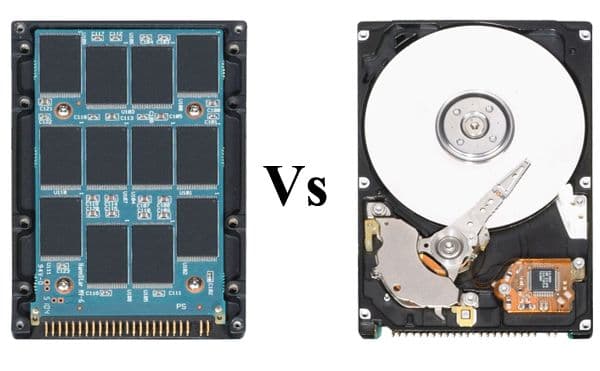
An SSD, also known as a Solid State Drive, is a modern storage device that uses flash memory to store information. Unlike traditional hard drives, SSDs have no moving mechanical parts.
This technology allows laptops to access information much faster, resulting in quicker startup times, faster file transfers and improved application loading.
Most modern laptops come with SSD storage capacities such as 128GB, 256GB, 512GB, 1TB and 2TB.
Advantages of SSD Storage
1. Faster Performance
One of the biggest advantages of SSD storage is speed. Laptops equipped with SSDs generally start faster, open applications quickly and transfer files more efficiently than comparable HDD-equipped laptops.
2. Improved Laptop Responsiveness
An SSD helps your laptop respond quickly when opening programs, browsing files, installing software and performing everyday tasks.
3. Better Durability
SSDs have no spinning disks or mechanical read/write heads. This makes them more resistant to physical shocks and vibrations than traditional HDDs.
4. Lower Power Consumption
SSDs generally consume less power than traditional mechanical hard drives, which can help improve laptop battery life.
5. Quiet Operation
Since SSDs have no moving parts, they operate silently without the spinning or clicking sounds associated with mechanical hard drives.
Disadvantages of SSD Storage
SSDs generally cost more per gigabyte than HDDs.
Higher-capacity SSDs can be expensive.
Flash memory has finite write endurance, although modern SSDs are designed to last for years under normal use.
What Is an HDD (Hard Disk Drive)?
An HDD, also known as a Hard Disk Drive, is a traditional storage device that uses rotating magnetic disks to store and retrieve information.
HDDs have been used in computers for many years and remain popular because they offer large storage capacities at relatively affordable prices.
Common HDD capacities include 500GB, 1TB, 2TB and 4TB.
Advantages of HDD Storage
1. Affordable Storage
HDDs are generally cheaper than SSDs when comparing the cost per gigabyte. This makes them suitable for people who need large storage capacity on a limited budget.
2. Large Storage Capacity
HDDs are available in high capacities, making them useful for storing movies, photographs, documents, games and large collections of files.
3. Suitable for Data Storage
HDDs are useful for storing backups, archived documents, videos and other files that do not require extremely fast access speeds.
Disadvantages of HDD Storage
Slower startup and application loading times.
Moving mechanical parts can wear out.
More vulnerable to physical shocks and vibrations.
Can produce noticeable operating noise.
Generally consumes more power than an SSD.
SSD vs HDD: Key Differences
The following table highlights the major differences between SSD and HDD storage.
| Feature | SSD | HDD |
|---|---|---|
| Technology | Flash memory | Magnetic disks |
| Speed | Very fast | Slower |
| Durability | More shock-resistant | More sensitive to shocks |
| Noise | Silent | Can produce noise |
| Power consumption | Generally lower | Generally higher |
| Price per GB | Higher | Lower |
| Storage capacity | Available in large capacities | Available in large capacities |
| Boot time | Faster | Slower |
| Application loading | Faster | Slower |
| Best for | Performance and everyday use | Affordable bulk storage |
Which Is Faster: SSD or HDD?
SSD storage is significantly faster than traditional HDD storage.
A typical SATA SSD can deliver sequential read speeds of around 500–550MB/s, while many traditional laptop HDDs operate around 80–160MB/s, depending on the drive.
NVMe SSDs can be considerably faster, with some modern models delivering several thousand MB/s.
This difference is noticeable when starting Windows, opening applications, transferring files and loading games.
For example, a laptop with an SSD will generally boot faster than a similar laptop with an HDD.
Which Is Better for Gaming: SSD or HDD?
For gaming, SSD storage is generally the better choice.
Modern games contain large files, textures and other data that need to be accessed quickly. An SSD can reduce loading times and improve the overall gaming experience.
However, an SSD does not automatically increase gaming frame rates. The processor, graphics card and RAM have a major influence on gaming performance.
If you enjoy playing modern PC games, a laptop with a 512GB SSD or 1TB SSD is a good starting point.
Which Is Better for Students and Office Work?
For students and office workers, SSD storage is the recommended option.
Students often use applications such as Microsoft Word, Excel, PowerPoint, web browsers and online learning platforms. An SSD helps these applications load quickly and makes everyday computing more responsive.
Business professionals can also benefit from SSD-equipped laptops because they improve productivity when handling multiple applications and documents.
Popular laptop models with SSD configurations include:
HP EliteBook laptops.
Dell Latitude laptops.
Lenovo ThinkPad laptops.
HP ProBook laptops.
Apple MacBook laptops.
Can You Upgrade an HDD to an SSD?
Yes. Many laptops that originally came with HDD storage can be upgraded to an SSD.
However, compatibility depends on the laptop model and available storage connections.
Before upgrading, check whether your laptop supports a 2.5-inch SATA SSD or an M.2 SATA or NVMe SSD.
Upgrading from an HDD to an SSD can make an older laptop feel significantly faster without necessarily replacing the entire computer.
You can also clone your existing HDD to the new SSD to transfer Windows, applications and personal files, provided the new drive has sufficient capacity.
Which SSD Capacity Should You Choose?
Choosing the right SSD capacity depends on how you use your laptop.
| SSD capacity | Recommended usage |
|---|---|
| 128GB | Basic computing and light usage |
| 256GB | Students and everyday office work |
| 512GB | Business, multitasking and general productivity |
| 1TB | Gaming, video editing and large files |
| 2TB | Professional workloads and extensive storage needs |
For most laptop buyers in Kenya, a 512GB SSD provides a good balance between storage capacity and everyday performance.
SSD vs HDD: Which Should You Buy in Kenya in 2026?
If you are purchasing a new laptop in Kenya in 2026, an SSD is generally the better choice.
Although HDDs offer affordable large-capacity storage, SSDs provide faster performance, quieter operation, better shock resistance and improved responsiveness.
For students, business owners, professionals and gamers, SSD storage offers a better everyday computing experience.
However, if you regularly store large quantities of videos, photographs and other files, an HDD can still be useful as an additional storage device.
Conclusion
The debate between SSD vs HDD comes down to speed, storage capacity, durability and price.
SSDs are the best choice for users who want faster laptops, quick startup times, improved application performance and reliable everyday computing. HDDs remain useful for people who need affordable storage space for large files and backups.
If you are planning to buy an HP EliteBook, Dell Latitude, Lenovo ThinkPad or another laptop in Kenya, consider choosing a model with at least 256GB SSD storage. For better flexibility and long-term use, 512GB SSD storage is an excellent option.
Ultimately, choosing the right storage technology will help you enjoy better laptop performance and get more value for your money.